
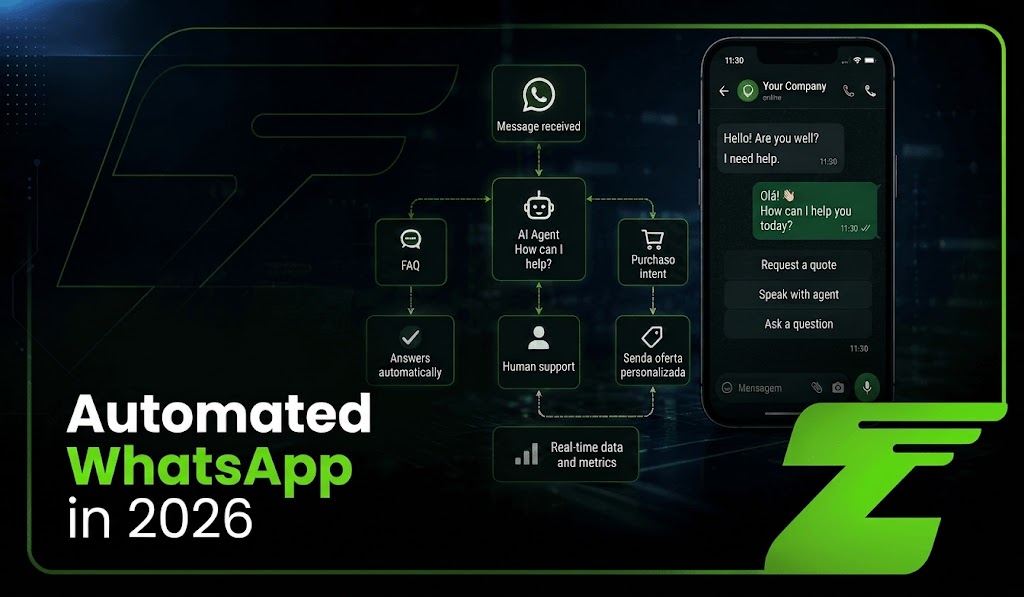
In 2026, automated WhatsApp plays an increasingly important role in customer service operations that need to handle high interaction volumes, different customer journeys, and growing expectations for faster responses.
With the evolution of Artificial Intelligence and automation tools, companies can build workflows capable of answering questions, collecting information, routing requests, and connecting conversations with internal systems.
The challenge is scaling without turning customer service into a rigid or impersonal experience.
To achieve this, technology, customer service, and operations leaders need to understand what should be automated, when a person should step in, and how to connect WhatsApp, AI, and business systems securely.
In this guide, you will learn how an automated customer service operation works, which processes can be automated, the differences between the WhatsApp Business app and API-based infrastructure, and which precautions should be considered during implementation.
In this scenario, Z-API works as an integration layer between WhatsApp and company systems, providing REST APIs and webhooks for sending, receiving, and monitoring events. Learn more below.
What is automated WhatsApp?
Automated WhatsApp goes beyond away messages or menus with predefined options.
It is an operation that connects WhatsApp with APIs, webhooks, artificial intelligence, and systems such as CRM, ERP, or Help Desk platforms to automate stages of customer service and integrate information across different departments.
In practice, automation can receive requests, identify intent, query external systems, send responses, and route cases to human agents.
Z-API provides APIs and webhooks to connect these applications with WhatsApp. Messages sent through the API enter a processing queue, while webhooks make it possible to monitor incoming messages, outgoing messages, and status events.
The goal does not have to be replacing human customer service, but rather automating repetitive tasks and allowing people to focus on situations that require analysis, negotiation, or greater sensitivity.
What can be automated in customer service?
The first step is to identify repetitive interactions with clear rules and information that is already available in the company’s systems.
Quick answers and FAQs with RAG
Recurring questions about opening hours, policies, addresses, products, or procedures can be handled automatically.
When connected to a knowledge base through RAG (Retrieval-Augmented Generation), the agent can retrieve relevant information before responding.
This helps reduce unsupported answers, but it does not guarantee complete accuracy. Up-to-date content, reliable sources, and monitoring are still necessary.
Triage and routing
Automation can analyze the incoming message, collect information, and identify the type of request before routing the conversation.
This allows sales, finance, logistics, or support requests to reach the most appropriate workflow or professional with part of the context already structured.
Transactional and proactive notifications
Order confirmations, payment updates, delivery information, and reminders can be sent automatically when connected to the systems responsible for those data points.
Z-API also supports different message formats and interactive features, including images, button lists, and a Pix button.
Important: sending a Pix button does not mean validating the payment. That confirmation must come from the integrated financial system or payment gateway.
Follow-ups and ticket monitoring
Workflows can monitor deadlines and ticket statuses. If a request remains unresolved beyond a defined threshold, automation can notify the responsible team or update the customer on its progress.
The best approach is to work with SLA rules, priorities, and exceptions instead of turning every follow-up into an automatic message.
Satisfaction surveys
After specific stages of the customer service journey, automation can request ratings such as CSAT or NPS and send the results to CRM, Help Desk, or analytics tools.
This reduces manual work and makes it easier to consolidate performance indicators, as long as the survey is triggered at the appropriate point in the company’s customer journey.
WhatsApp Business vs. API integration: the operational turning point
The WhatsApp Business app works well for smaller operations, but it can become limited when a company needs to integrate customer service, automation, and internal systems at a larger scale.
Limitations of the WhatsApp Business app
- Number of devices: in the standard configuration, WhatsApp Business allows up to four devices in addition to the primary phone.
- Limited integrations: the app does not provide the same API and webhook structure required to connect custom workflows directly to CRM, ERP, or AI applications.
- Caution with external tools: WhatsApp restricts unauthorized applications and automation methods and may limit or suspend accounts that violate its terms and policies.
Integrating WhatsApp with Z-API
For operations that need to connect WhatsApp with other systems, Z-API provides an integration layer based on REST APIs and webhooks.
- Integration with multiple systems: different applications can consume the API and instance events, allowing companies to build customer service workflows, bots, and integrations according to their own architecture.
- APIs and webhooks: Z-API provides REST endpoints and webhooks for incoming messages, outgoing messages, and status changes.
- Architecture without dependence on a physical phone in certain models: Z-API currently works with Web and Mobile instances, and the selected architecture determines how the connection is established.
A note for companies using the Official WhatsApp API: Meta will start charging per message in October.
How to build an automated operation: the technology architecture
A modern customer service operation can be structured around four integrated components.
Messaging API
Z-API works as the layer that connects WhatsApp to company systems through REST APIs and webhooks.
Messages sent through the API enter a processing queue, while webhooks allow the application to monitor sending, receiving, and status changes.
Chatbot or AI Agent
This is the layer responsible for customer service logic.
It can range from structured workflows with menus and buttons to AI agents capable of interpreting messages, querying information, and selecting actions according to rules defined by the company.
Webhooks
Webhooks allow an application to be notified when specific events happen on WhatsApp.
For example, Z-API’s incoming-message webhook is triggered when someone interacts with the connected number.
CRM or customer service platform
CRM and Help Desk platforms can centralize customer data, history, tickets, and other information relevant to customer service.
Integrating them with WhatsApp allows these data to be used to provide context during conversations and record updates generated by automation.
Examples of automation applied to business
Below are some examples of automation across different industries.
Scenario 1: automated financial inquiry
The customer asks:
“What is the status of my August invoice?”
Automation receives the message, queries the ERP or financial system, and returns the available information.
If there is an integration with the payment system, it can also generate the required payment details and send them through WhatsApp. Z-API also supports a Pix button.
Important: querying and validating the payment are responsibilities of the integrated financial system, not Z-API.
Scenario 2: routing to specialized support
The customer sends a complaint that requires technical analysis.
AI can identify signs of complexity, classify the request according to defined rules, and route the case to the responsible team.
The system can also generate a conversation summary to provide the agent with context before the transfer.
It is better to avoid claiming that AI can accurately identify “churn risk” based solely on sentiment: this should be treated as a classification signal, not as a guaranteed conclusion.
Scenario 3: automated post-purchase support
After delivery confirmation is recorded in the logistics system, an automation can start a post-purchase workflow:
“Has your order arrived? If you need help with installation or using the product, we can assist you here.”
The trigger can come from the ERP, e-commerce, or logistics system, while Z-API handles the communication through WhatsApp.
You may also want to see: Official WhatsApp API vs. Z-API: differences, costs, and risks in 2026.
How can you prevent automation from hurting the customer experience?
Automating customer service does not mean creating rigid journeys.
The operation needs to combine efficiency with clear paths for situations that require human involvement.
Provide human handoff
Customers should have a clear way to request human support when automation cannot solve their problem.
It is also important to define automatic handoff criteria for complaints, exceptions, negotiations, or sensitive situations.
Avoid excessive messaging
On WhatsApp, prioritize concise and easy-to-read messages.
Avoid both overly long blocks of text and unnecessary sequences of short messages. When appropriate, use features such as lists and buttons to simplify interactions.
Personalize with context
Data available in the CRM can help adapt the conversation based on history, subscribed product, or customer journey stage.
Personalization should only use information that is necessary and authorized for that interaction.
Monitor and improve continuously
Automation needs ongoing monitoring.
Analyze metrics such as abandonment, resolution, handoff, response time, and CSAT, along with application logs and webhook events.
Z-API provides webhooks for incoming messages, outgoing messages, status updates, and disconnections, which can feed this monitoring process.
Manual vs. automated customer service
| Criterion | Manual operation | Automated operation |
|---|---|---|
| First response | Depends on team availability | Can start automatically |
| Peak capacity | Limited by available staff | Can absorb higher volume depending on infrastructure |
| Operating cost | Tends to increase with human capacity | Can reduce manual tasks, but includes technology and AI costs |
| Data logging | May require manual input | Can be integrated automatically with systems |
| Predictability | Depends on the operation’s structure | Z-API uses monthly per-instance pricing |
| AI integration | Possible, but with less automation | Can be integrated through APIs, webhooks, and other tools |
The future of customer service combines automation and people
Building an automated WhatsApp operation can help companies increase speed, connect systems, and reduce repetitive tasks.
Z-API works as a communication layer between WhatsApp and applications, providing REST APIs, webhooks, and resources for building different customer service workflows.
The competitive advantage does not come from automating everything, but from automating the right interactions while keeping people available at the moments when they genuinely add value.
How much of your customer service still depends on tasks that could be automated? Try Z-API and see how our API can help automate your customer service operation.
FAQ: common questions about WhatsApp automation
1. Does automation completely replace the support team?
No.
It can handle repetitive tasks, triage, lookups, and notifications, while people remain responsible for cases that require judgment, negotiation, or greater sensitivity.
2. Does automation increase the risk of the number being blocked?
The risk depends on several factors, especially usage patterns, recipients, and message behavior.
Using Z-API does not eliminate the possibility of account restrictions.
Z-API documentation itself recommends avoiding spam and unwanted messages and states that technical mechanisms do not protect an operation that violates WhatsApp usage rules.
3. Do I need programming skills to automate WhatsApp?
Not necessarily.
More advanced operations may require development, but visual automation tools such as n8n make it possible to build workflows and combine integrations, APIs, and AI with less code.
Current n8n documentation positions the platform specifically as a process automation tool with AI capabilities.
4. How can Z-API help with cost predictability?
Z-API currently uses a monthly per-instance subscription model with no platform-imposed per-message charge within the contracted plan.
For high-volume operations, this model can make the cost of the messaging layer easier to forecast.
However, total cost may also include AI, CRM, automation tools, infrastructure, and staff.