
If you work in technology, software development, or process automation, you have probably noticed an important shift in how artificial intelligence is being used.
The conversation is no longer limited to models that can write content, summarize documents, or answer questions. Companies and developers are now building AI agents that can query systems, use tools, and perform tasks within real-world workflows.
One of the technologies driving this transformation is MCP (Model Context Protocol).
Without an external integration, a language model can explain how to organize a CRM, analyze a process, or suggest a campaign. However, on its own, it cannot access those systems and carry out those actions.
MCP helps build that bridge: compatible AI applications can discover available tools, retrieve authorized information, and execute actions exposed by MCP servers.
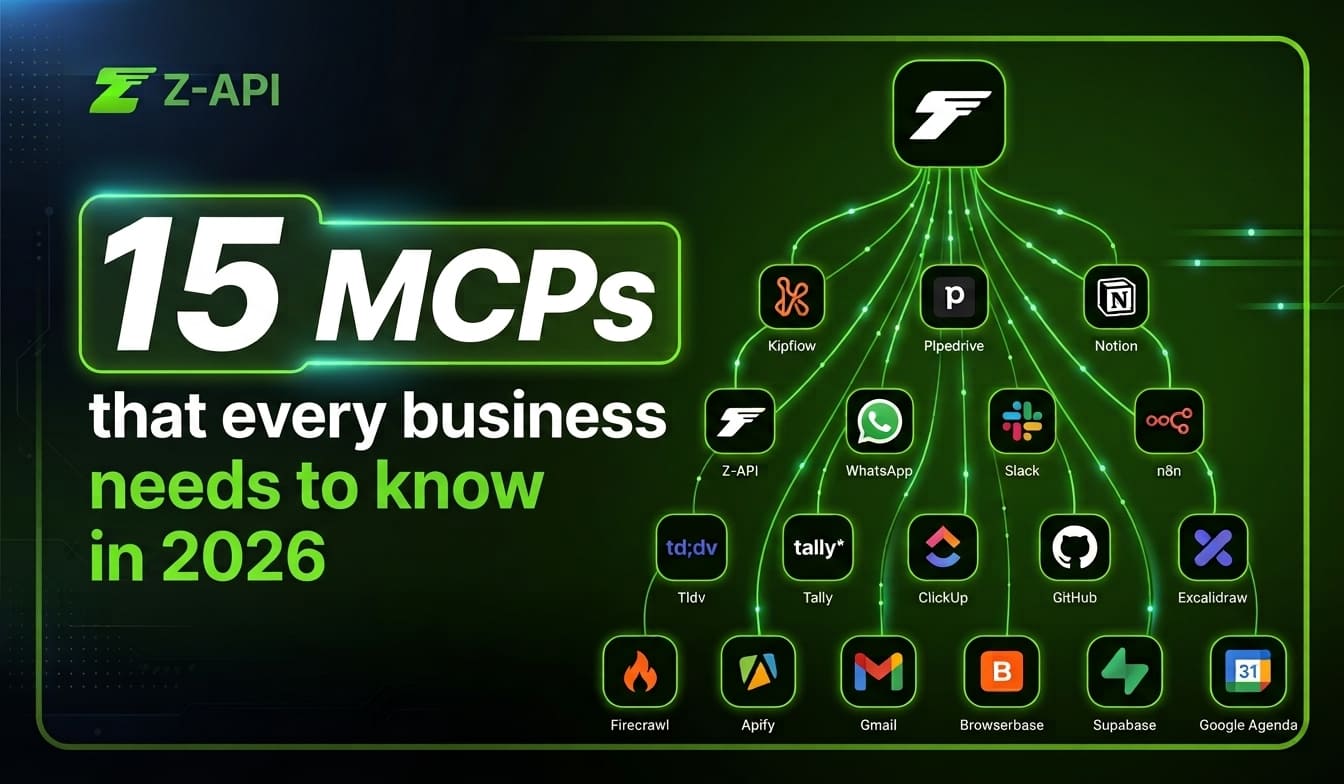
In this article, we have selected 15 MCP servers worth knowing for developers, SaaS companies, and automation agencies.
What is MCP?
Model Context Protocol is an open standard designed to organize communication between AI applications and external systems.
Instead of building a completely different integration for every assistant, MCP provides a standardized way to expose resources, data, and tools that an AI application can use.
In practice, an MCP server can make actions available such as:
- retrieving information from a CRM;
- creating tasks in a project management platform;
- searching documents;
- running database queries;
- opening or updating an issue;
- triggering an automation workflow;
- sending a message through an API.
The actions available depend on the implementation, the permissions granted, and the security policies of each tool.
Why is MCP gaining traction in the tech market?
Consider an analysis of lost opportunities in a CRM. In a conventional workflow, someone would need to export the records, organize the data, send it to an AI assistant, and then manually apply the recommendations.
With compatible MCP servers, you can create a workflow where an authorized agent:
- retrieves opportunities from the CRM;
- identifies objection patterns;
- generates suggested approaches;
- sends the results for approval;
- triggers a communication tool.
A possible command could be:
“Analyze the last 50 lost opportunities in Pipedrive, group the main objections, and prepare reactivation messages for eligible contacts.”
Depending on the connected tools, permissions, and confirmation rules, the agent could also execute subsequent steps.
The value is not only in automating a fixed sequence, but in allowing AI to use context to select and combine tools within predefined boundaries.
15 MCP servers to know in 2026
If you want your operation to become truly AI-driven, you need the right connectors. We divided 15 relevant MCP servers into five strategic areas.
Area 1: CRM and sales operations
1. Pipedrive MCP
The Pipedrive MCP allows AI applications to connect with data and capabilities provided by the CRM.
Depending on the permissions and tools enabled, an agent may be able to retrieve deals, contacts, activities, and other sales information, reducing the need for manual exports.
Possible use cases include:
- analyzing open opportunities;
- summarizing deal history;
- preparing follow-ups;
- identifying stalled deals;
- supporting lead qualification.
2. KipFlow MCP
KipFlow can be used to connect AI agents with operational workflows and sales processes. Before using it in production, confirm:
- who maintains the implementation;
- which tools are available;
- which systems are supported;
- the maintenance level;
- the authentication model.
Area 2: communication and execution
3. Gmail MCP
MCP servers connected to Gmail can allow authorized agents to search messages, summarize conversations, prepare replies, and organize inbox information.
Because email contains sensitive data, it is best to keep scopes limited and require confirmation before sending, deleting, or forwarding messages.
4. Z-API and MCP
Z-API turns WhatsApp into a programmable platform, allowing other systems to send messages and track events through APIs and webhooks.
With the official Z-API MCP Server, API routes can be exposed to an agent as structured tools. This means AI applications can trigger authorized Z-API functions through natural language.
Possible use cases include:
- retrieving the information needed for a conversation;
- preparing contextualized messages;
- sending text and media;
- querying information exposed through the integration;
- combining WhatsApp with CRMs, databases, and automation tools.
Area 3: projects and knowledge
5. Notion MCP
The Notion MCP server allows authorized AI tools to interact with workspace pages and information.
This can help with tasks such as:
- searching documentation;
- creating pages;
- updating content;
- organizing knowledge;
- turning meetings into structured records.
6. ClickUp MCP
An MCP integration with ClickUp may allow agents to retrieve and update tasks, assignees, deadlines, and project statuses.
Confirm whether the server you plan to use is official or community-maintained and which operations are actually supported.
7. Google Calendar MCP
Servers connected to Google Calendar can help agents retrieve events, identify available time slots, and prepare meetings.
Creating, modifying, or deleting events should require explicit permissions and, ideally, user confirmation.
8. Tally MCP
An integration with Tally can turn form responses into context for AI agents.
Examples include:
- summarizing responses;
- classifying requests;
- routing leads;
- triggering onboarding processes;
- generating tasks based on collected data.
9. tl;dv MCP
By connecting meeting transcripts to an AI application, it becomes possible to locate decisions, summarize conversations, and extract next steps.
Check the implementation you choose to confirm which data can be accessed and which meeting platforms are supported.
Area 4: data, browsers, and automation
10. Firecrawl MCP
Firecrawl helps AI applications collect web content in more structured formats.
It can be used for:
- market research;
- analysis of public webpages;
- content monitoring;
- competitor research;
- database enrichment.
Usage should comply with terms of service, privacy requirements, and any rules that apply to the content being accessed.
11. Apify MCP
The Apify ecosystem offers tools for collecting and processing public web data.
With an MCP server, agents can select and execute available resources according to the goal of the task.
Availability and reliability depend on the Actor being used, the source being accessed, and the policies of the target platform.
12. Browserbase MCP
Browserbase provides browser infrastructure for agents and automations.
This makes it possible to run workflows that depend on navigation, filling out pages, or interacting with web interfaces.
Because browser automations can perform sensitive actions, it is important to use controlled environments, permission limits, and execution logs.
13. n8n MCP
An MCP integration with n8n can turn existing workflows into tools that AI agents can access.
Instead of giving agents direct access to every system, a company can expose only predefined workflows, such as:
- registering a lead;
- generating a report;
- opening a support ticket;
- retrieving an order;
- starting an onboarding process.
This approach can provide more control than giving unrestricted access to every application.
Area 5: development and infrastructure
14. GitHub MCP
The official GitHub MCP server connects AI tools with repositories and platform resources.
Depending on the permissions granted, it can support activities such as:
- searching code;
- retrieving issues;
- analyzing pull requests;
- creating or updating items;
- providing repository context.
Operations that modify code or configurations should go through human review and repository protection policies.
15. Supabase MCP
The Supabase MCP server allows development assistants to connect to projects on the platform.
Possible use cases include:
- inspecting database structure;
- performing authorized operations;
- supporting schema creation;
- analyzing configurations;
- providing project context during development.
In production environments, use restricted permissions, separate projects, and review mechanisms before critical changes are applied.
How to connect MCP, AI, and WhatsApp securely
The main opportunity with MCP is not to give agents unrestricted access to systems, but to create controlled interfaces that allow them to use specific tools with clear permissions and traceability.
In an operation connected to WhatsApp, one possible architecture could combine:
- a CRM to provide customer data;
- a knowledge base to guide responses;
- an AI agent to analyze context;
- Z-API to perform authorized actions on WhatsApp;
- an automation system to log and monitor the workflow.
For example:
- the CRM identifies a lead that has not replied;
- the agent retrieves authorized information;
- the AI prepares a message;
- a rule checks consent and eligibility;
- a person approves the content when required;
- Z-API sends the message;
- events are returned to the system through webhooks.
This model combines intelligence, automation, and operational control.
Best practices before connecting an MCP server
Before deploying an integration to production:
- confirm the source and maintainer of the server;
- review the code or documentation;
- grant only the permissions required;
- separate testing and production environments;
- keep logs of actions performed;
- require confirmation for critical operations;
- protect tokens and credentials;
- limit execution volumes and rates;
- monitor unexpected behavior;
- maintain a way to stop the agent.
MCP makes it easier to connect AI applications with tools, but it does not eliminate the need for proper architecture, security, and governance.
The future is agentic, but it needs control
MCP servers represent an important step toward turning AI assistants into applications capable of working with real tools and real data.
For developers, SaaS companies, and automation agencies, the benefit lies in reducing repetitive integrations, creating more natural experiences, and connecting different stages of an operation.
On WhatsApp, this evolution can create room for agents that retrieve context, prepare responses, trigger workflows, and execute authorized communications.
The real differentiator will not simply be allowing AI to “do everything.” It will be building agents that perform the right actions, with the right data, within the rules defined by the company.
Want to connect AI agents to WhatsApp?
Explore Z-API and see how you can integrate WhatsApp with your systems through a simple API, webhooks, and features built for developers, SaaS companies, and automation teams.